Prepare Phone Photos for a Printed Album
Prepare phone photographs by finding the best available source, keeping the intended edit distinct from the original, and checking the actual exported files. A picture that looks good in a message thread may be a resized derivative. A phone library's thumbnail is not proof that the file delivered to the album maker contains the same pixels or appearance.
Work on a small selection before exporting an entire year. Establish what the receiving album service accepts, then verify a portrait, a dark scene and a heavily edited photograph through that exact route. This catches practical problems while the files are still easy to identify.
Find the source before enlarging a shared copy
Ask the person who took a photograph for the full file, rather than saving a screenshot of its display. A screenshot captures the screen presentation, which may include a reduced image, interface elements or another crop. It cannot recover details that were already absent from the displayed version.
Do not use file size alone to choose the better picture. Different formats and compression settings can produce different byte sizes from similar dimensions. Inspect the pixel dimensions, the actual image and its relationship to the intended edit. A larger file can still be an enlarged or degraded derivative.
| What you received | Check first | Useful next action |
|---|---|---|
| Original camera file | Does it contain the desired framing and exposure? | Retain it and create a separate production copy |
| Edited export | Are the intended corrections present? | Compare with the approved appearance |
| Messaging attachment | Did the route change dimensions or format? | Request another transfer if the supplied file is inadequate |
| Screenshot | Is there a better source behind this display? | Use the screenshot only when its limitation is understood |
Keep original, edited and delivery versions separate
Apple's documentation distinguishes an unmodified original export from export options that produce other formats and versions. Its HEIF guidance also notes that sharing routes can convert media for compatibility. Those behaviors are reasons to inspect the exported result, not to assume that one button name means the same thing in every application.
Use clear working roles: source, approved edit and album delivery. The source preserves what was received. The approved edit represents the appearance you intend. The delivery copy follows the receiving workflow. One file may serve more than one role, but the role should be a conscious decision.
Do not overwrite the only source while experimenting. If a monochrome edit looks better in a draft but is later rejected, you should be able to return to the source without trying to reconstruct its colors.
Count moments and deliverable files differently
A moving-photo feature can contain a still image and a motion component. A burst can contain multiple distinct frames. Neither means that every component belongs on a printed page. Select the still image that communicates the moment, while preserving other components separately if they matter to the family record.
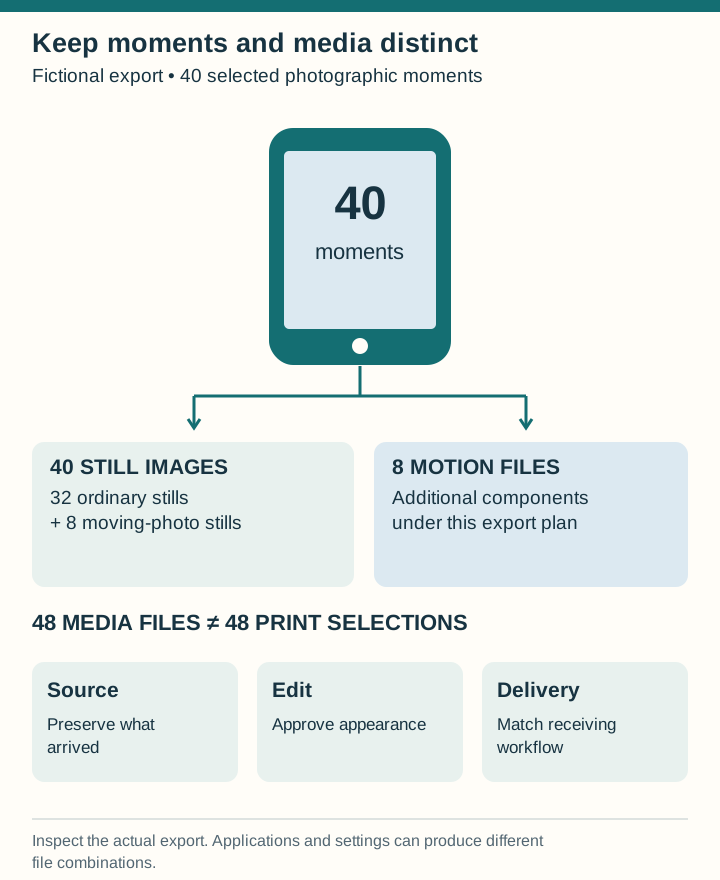
In a fictional project, 40 selected moments include 32 ordinary stills and 8 moving photos. If the chosen export route supplies one image for every moment and one additional motion file for each moving photo, it produces 48 media files. The print selection still contains 40 image candidates. The example's count follows its stated export assumptions; verify what your application actually creates.
| Selection type | Selected moments | Still-image files | Additional motion files |
|---|---|---|---|
| Ordinary stills | 32 | 32 | 0 |
| Moving photos | 8 | 8 | 8 |
| Total | 40 | 40 | 8 |
Label the print-ready image and its original association. If an export creates metadata sidecars as well, do not count them as extra photographs. An unexpected total should prompt inspection of file types and identities, not immediate deletion of everything unfamiliar.
Choose among near-duplicates with a concrete purpose
Compare a burst as a group. First remove accidental frames from the album shortlist, then choose the image with the useful expression, gesture or relationship. A slightly less technically perfect frame can carry more information than the sharpest one, but decide at the intended print size rather than hiding the weakness in a tiny thumbnail.
Do not keep five near-identical images merely because choosing feels difficult. A sequence earns space when something changes: a child builds, tests and repairs a tower, for example. If every frame says the same thing, one may be enough. The original files can remain in the archive even when only one reaches the page.
Check dates and captions across devices
Pictures from different phones may sort unexpectedly after travel, clock changes or transfer. Use available event information and neighbouring images to investigate rather than treating the current folder order as unquestionable chronology. Keep an adjustment note if you change a timestamp.
IPTC distinguishes descriptive information from image-creation dates and locations. A saved or exported file's current filesystem date may describe a later operation. For the printed caption, use the event information you can support, following the family caption guide.
Inspect appearance after the actual transfer
Open exported files outside the source library. Check whether the desired crop, rotation and edits are present. Look closely at dark detail, bright areas and strongly processed portraits. If an application or service displays the same file differently, investigate the output requirements before making a compensating edit that may create a second problem.
Where the phone presentation uses an extended brightness range or other display-dependent treatment, request a relevant print proof rather than promising the paper will reproduce the screen effect. The paper comparison guide provides a small test set that can expose differences.
- Verify the exact exported dimensions and supported format.
- Check each selected picture against the approved version.
- Retain the association with its photographer and original identifier.
- Review which personal details belong in the shared album.
Finish with one identified print-selection folder and a separate source collection. The family yearbook plan turns that selection into a balanced account of the year. A clean export cannot choose the story for you, but it makes sure the story uses the images you actually intended.